Use the following settings when setting up the IBM 4400-004 Thermal printer (Printronix T5000r) in Windows XP. Note: There are no drivers for Windows 10. Use a VM of Windows XP for install. You can find the 4400 driver on Robusta under the path DR/Bret/Drivers/IBM4400.
When setting up the IBM 4400-004 or Printronix T5000r printer in XP, use the driver found at the location listed above on Robusta. Make sure all your settings look like the images below:
You will need to create a new paper size in "Server Properties" under the "Printers and Faxes" window. Call it Solano Direct and use the following settings:
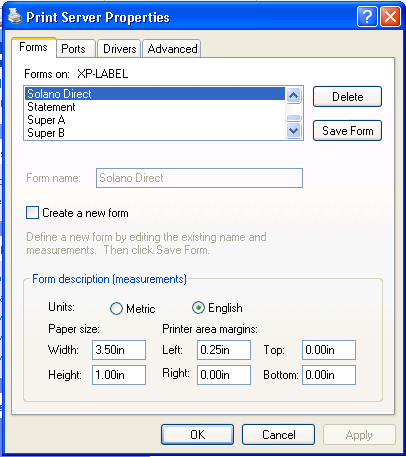
Make sure the rest of the printer settings look like the settings below:
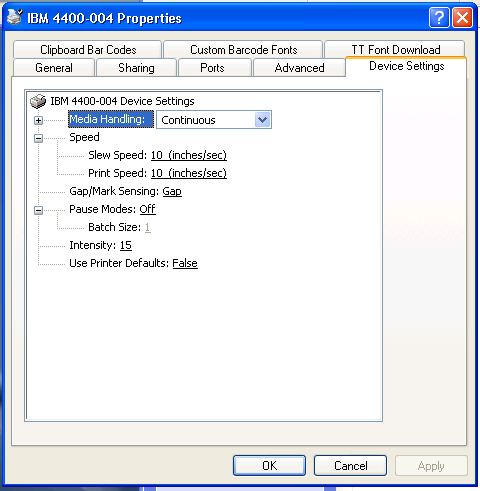
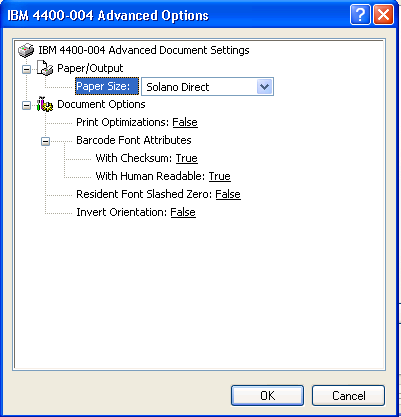
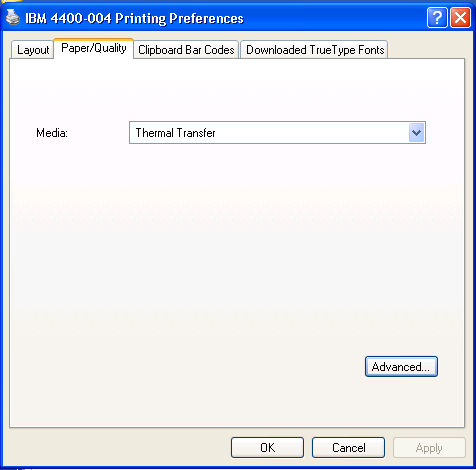
Always use WordPad to print. Select all, then bold the entire thing. Then select "Page Setup" and select the Solano Direct paper size. Match the values for the margins to those listed in the image below.
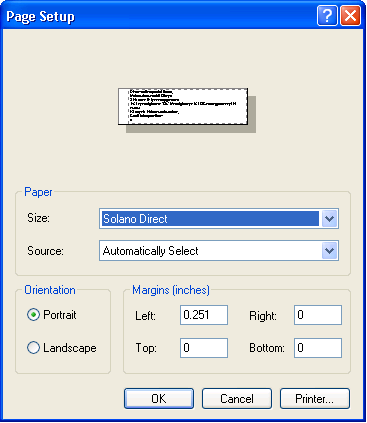
You are all set to print to the thermal printer once you have set everything up as described above.
0 Comments