Step 1: Find the customer record
To view a Customer Record, use one of the two techniques described in What Is A Customer Record? Namely, use a search query or the Customers screen (https://dashboard.stripe.com/customers/) on the Stripe Dashboard. As mentioned in How Do I Lookup A Customer Record?, if you know what you're looking for, search is probably the fastest way to find a record.
Step 2: Click "Create Payment"
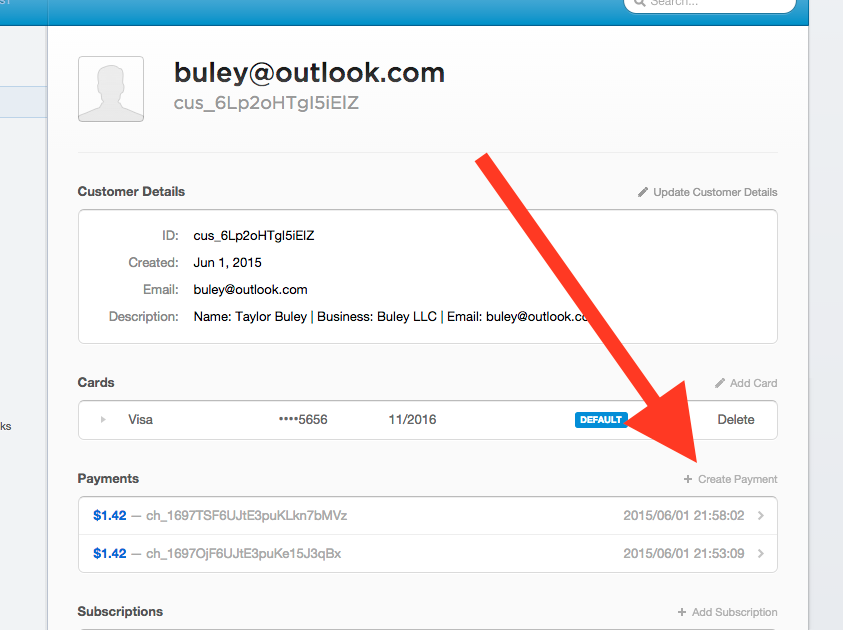
While looking at the Customer Record, click the "Create Payment" link from the Payments section.
Step 3: Fill Out The "Create a new payment" form
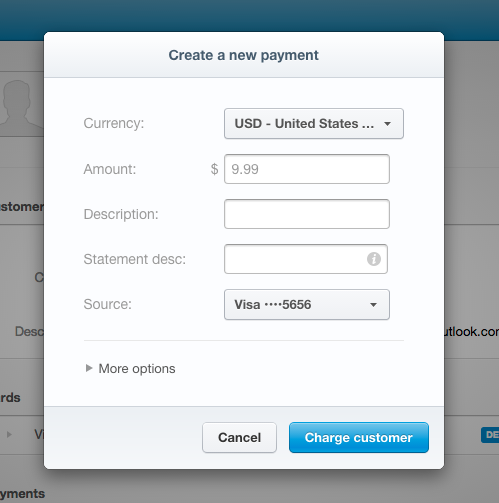
To cancel out on the process, click the "Cancel" button. Otherwise proceed to Step 4 and click the blue "Charge customer" button.
To authorize a charge but not capture it immediately, click "more options" and uncheck the "Capture this charge" option in the dropdown. The funds are then processed as an "authorization" and we have only 7 days to capture the charge. Follow the steps in How Do I Capture Or Release Authorized Funds? to act on this authorization.
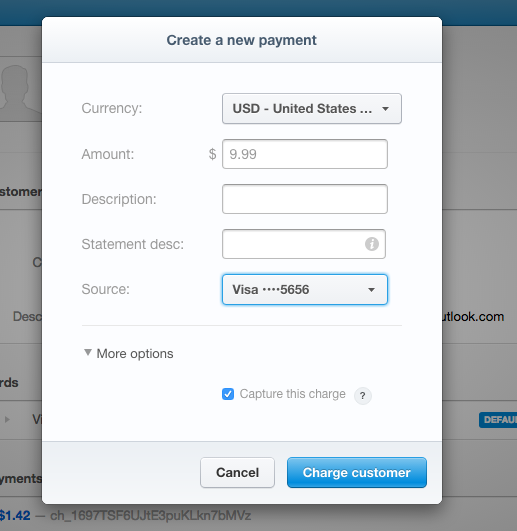
Step 4: Click the blue "Charge customer" button
0 Comments