1.) How to change the voicemail message associated with the Circulation Hunt Group x201:
Press *17, then press 201# then press #. Noted system greeting is playing so after recording make sure you make active for all calls.
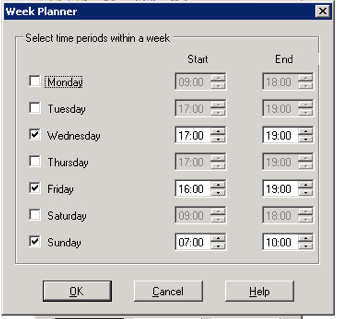
2.) I need to make sure I set the system to NOT transfer calls to Fairfield for Tuesday and Thursday. There is a Week Planner that I believe sends calls to our Fairfield site Tuesday - Friday and Sunday. I need calls to hit the Circulation Hunt Group in Davis and not forward today and Thursday (5th and 7th.)
"Tuesday - Friday" is the right condition calendar to change. You can remove or add days and hours in this calendar to make the system transfer calls to Fairfield on the day / hours indicated.
3.) How do I change the Classified and Circulation Auto Attendants (greeting menus.)
Hit *80 from any phone and enter "1234" as the passcode. Do not hit # or the passcode will not work. You can change both the Classified and Circulation Auto Attendants from this menu.
View of the "Tuesday - Friday" condition that controls the transferring of calls to Fairfield:
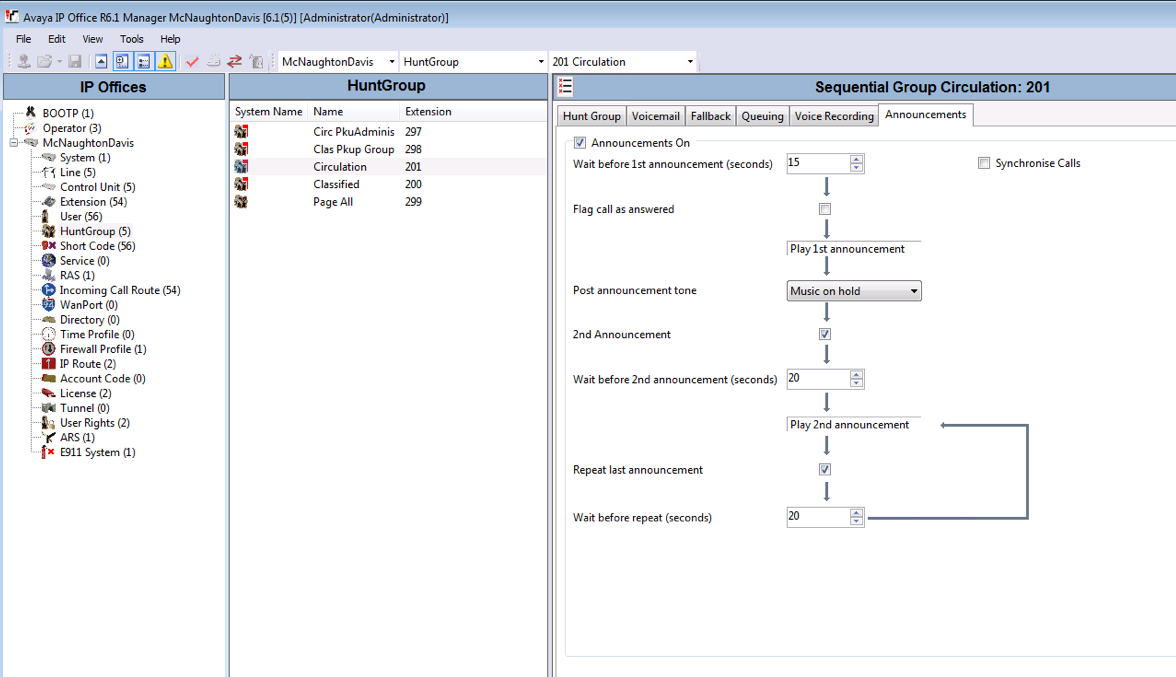
View of the announcement routing for the Circulation Hunt Group (x201)
0 Comments