A "Payment" is the transfer of money from one party to another. This is jargon we adopt from our use of Stripe. Usually this means the transfer of money from the customer's bank account to our business's bank account in exchange for some service or goods such as the usage of advertisement.
A Payment Record can be, but doesn't have to be, associated with a Customer Record. Such a relationship is typical because it's a useful way to retrieve or group payments by one entity. See What Is A Customer Record? for more info.
Stripe Dashboard
You can find Payment Records and view them on the Stripe Dashboard. To see a record, you can click on an item in either A) a search or B) on the Payment Record list found on the Payments screen of the Stripe Dashboard (https://dashboard.stripe.com/payments). See What Is The Stripe Dashboard? for more information on either feature.
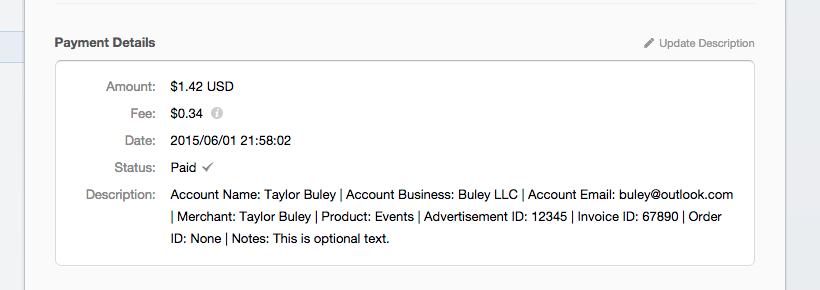
A Payment view contains information about the payment, including the email, customer name and the payment description. When using the Payment Form, the payment description contains a lot of useful information. To change this information, the "Update Description" link can be clicked on the top right of the "Payment Details" area.
When a Payment is optionally be tied to a Customer Record, this relationship appears in the "Connections" section of the payments view.

The Payment view may also have options to process authorized funds. See How Do I Process A New Payment (Or Authorization) For An Existing Customer Record And Credit Card? for more information on those options.


0 Comments